Voice cloning for video:
your voice in 43 languages
Voice cloning for video is when AI copies the voice straight from the video (timbre, manner, pace) and speaks the translation with it. No separate recording: upload the video, pick a language — and the person speaks it in their own voice.
 English
The clone was built from the lecture itself, no separate recording. All five languages keep the lecturer’s timbre and pace.
Original: David Kryscynski, «Generic Strategies Mini-Lecture», CC BY. Translation: Speeek.
 Russian
A Russian creator speaks English in his own voice. A light trace of the original accent stays — that’s how a clone from video sounds.
Original: «Откровения Продюсера», «Как сделать, чтобы твои видео выглядели дорого…» (youtube.com/watch?v=twytRncMLsU), CC BY 3.0. Translation: Speeek.
RussianShot in a studio with clean speech — plenty for the clone to build on. The English version also has lip sync.
Original: Теплица социальных технологий, «Как правильно снимать видео на телефон», CC BY. Translation: Speeek.
In all three videos the clone was built automatically from the speech in the video itself. Not a single separate voice recording.
How the clone is made
From the speech in your video — automatically. Or from a recording you upload yourself, when you need maximum likeness.
Automatically from the video
Upload a video. The AI finds the speaker’s speech in it, stitches a sample of up to a minute and builds the voice from it.
A bit of music and noise gets into the sample along with the speech — so the clone can sound slightly “roomy”.
From your own recording
Record a minute of speech in a quiet room and upload it to “Voices”. The voice is saved and goes into any translation.
No music, no noise — the clone is closer to the original.
One phrase, three versions to hear
One person, one phrase. A GrapheneOS review from YouTube, CC BY.
Try it on your own video5 minutes free, no card
What the voice clone keeps and what it doesn’t
So there are no surprises after the first video.
Carries over
- Timbre. The pitch and colour of the voice — what people recognise you by.
- Manner and pace. Fast or measured speech, pauses, energy of delivery.
- Background and music of the video. The original track stays under the new speech; the translation’s loudness is matched to the original.
- Different voices for different people. Up to 5 speakers, each with their own clone.
Smoothed out or changed
- Peak emotions. Shouting, laughing through words, a trembling voice get evened out. The timbre is yours, the intensity lower.
- Singing and whispering. The clone speaks, it doesn’t sing. A whisper turns into quiet normal speech.
- Accent. A clone from video speaks without an accent; your own voice — as recorded, with a “Remove accent” switch.
- Stress and names. Synthesis sometimes puts the stress in the wrong place. In the editor you set it with a mark after the vowel.
When a clone from video comes out worse
The clone repeats everything it hears in the sample. Four things that most often spoil the result.
Music under the voice
We separate it, but not perfectly: a loud bed leaves a trace in the timbre. Fixed by your own recorded voice.
People talking over each other
Overlaps are left out of the sample. Set fewer speakers than there are — two people merge into one “average” voice.
Too little speech
20 seconds is worse than 60. Under 10 — no clone, the speaker gets a library voice.
Echo and a distant microphone
A phone across the room, an echoey hall, shouting — the clone sounds “roomy”. The closer the mic, the better.
More on why a voice may not sound alike and how to fix it — in the help center.
Three places where you control the voice
Nothing to set up: the clone is selected by default. But you can change the voice before translation, after it, and add your own.
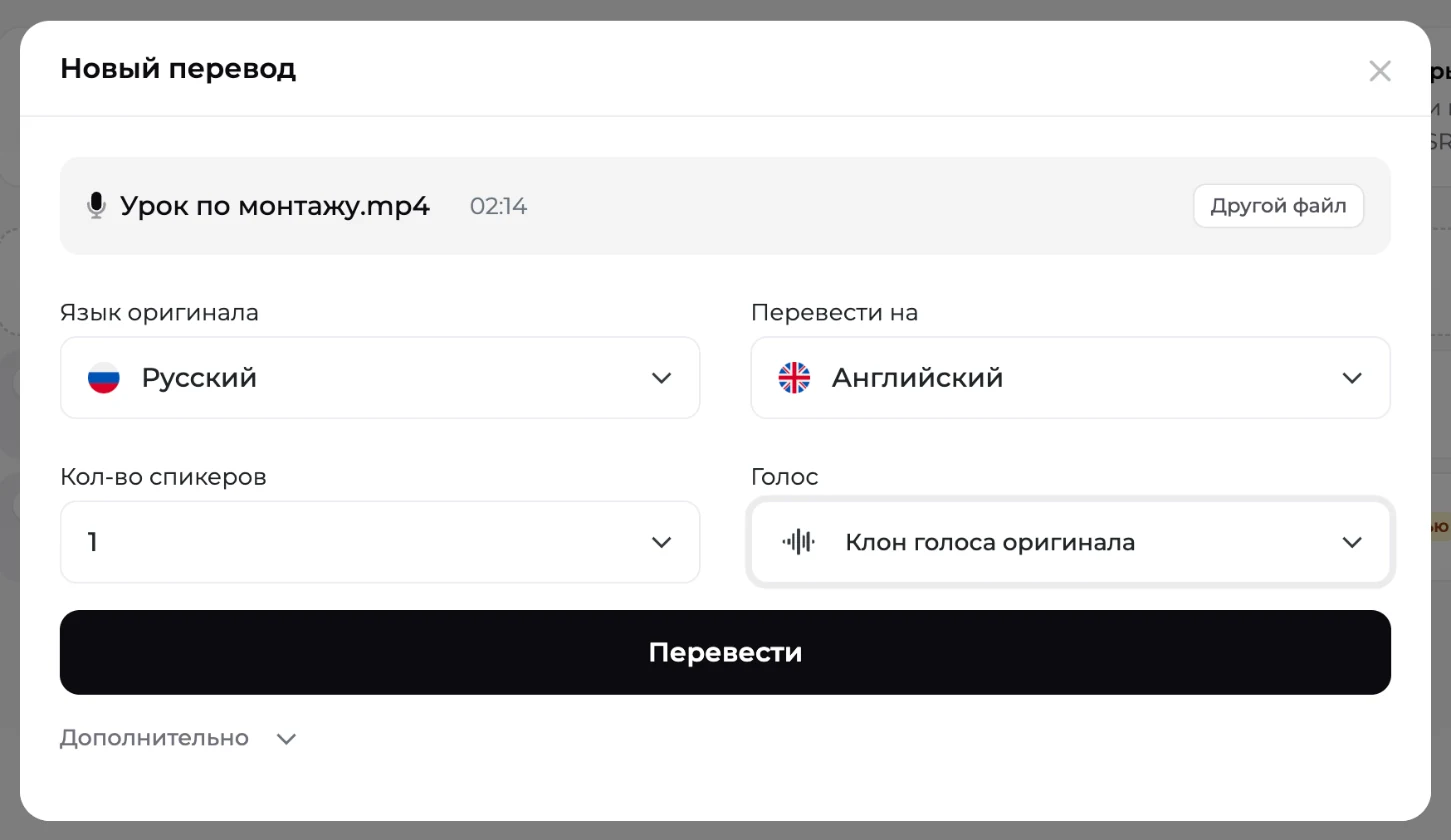
On upload
For each speaker — “Clone of the original voice”, your own voice from “My voices” or a library voice. The clone is the default.
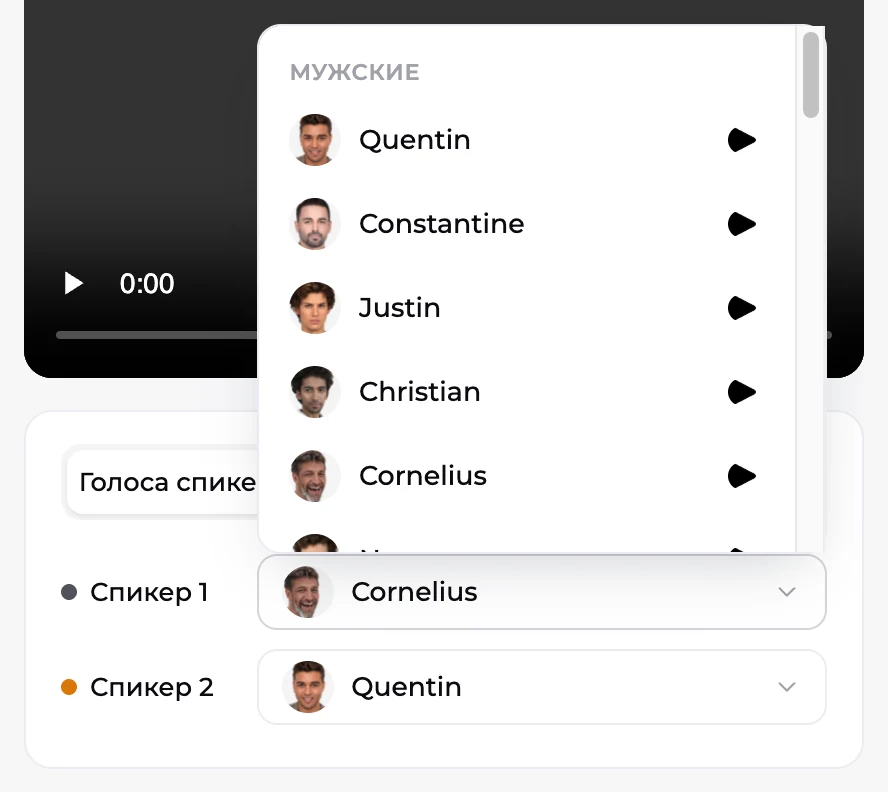
After translation
In the editor’s “Speaker voices” tab you can change any speaker’s voice. The lines are re-voiced — 1 minute per 2,000 characters.
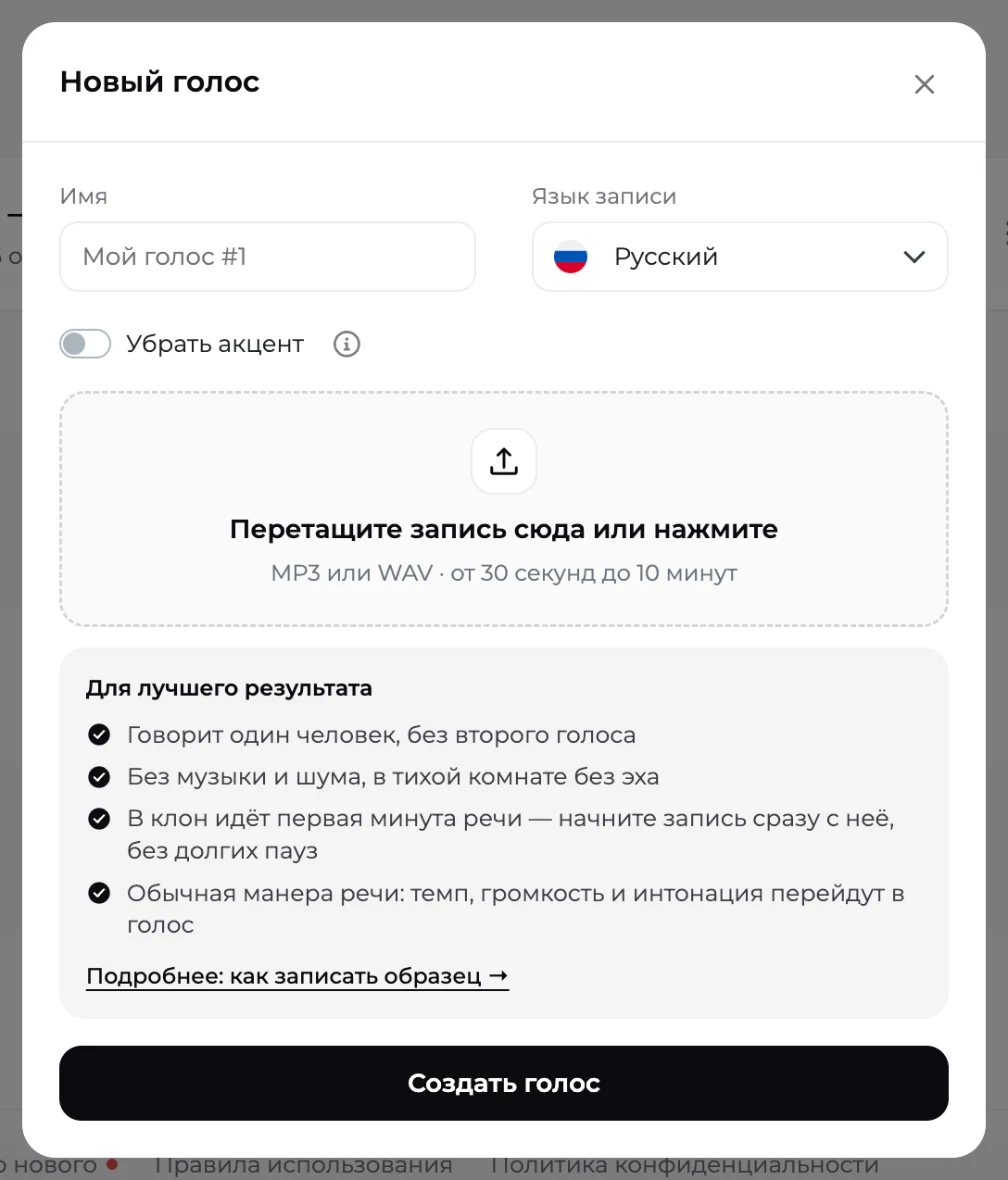
Your own voice
“Voices” → “Create voice”: name, recording language, file. A couple of minutes later the voice is active and available in all translations. How to record a sample
When a library voice is the better choice
The library has native voices for every target language, plus 17 premium voices on Pro.
You need clean, accent-free speech
Ads, product cards, training videos for a foreign market: the viewer doesn’t know the author and wants native-sounding speech.
The author’s voice isn’t recognisable
Faceless channels, voice-over, corporate instructions. A clone adds nothing here, and noise in the video can make it worse.
The video’s audio is poor
A conference recording, a call, the street. A library voice will sound better than a clone built from noise.
Voice cloning by plan
There’s no separate charge for the clone: it’s included in translation minutes. Plans differ in whose voice you get and how many of your own you can save.
| Free5 minutes, once | Startfrom $5 / 5 min | Profrom $15 / 10 min | Businessfrom $0.56 per minute | |
|---|---|---|---|---|
| Voice clone from video | first minute of the video, watermarked | one library voice | ||
| Speakers with their own voice | up to 5 | 1 | up to 5 | up to 5 |
| Own voices from recordings | 5 | 10 | ||
| Premium library voices | ||||
| Lip sync |
All packages and the price per minute — on the pricing page. How the lips are matched to the new speech — lip sync.
Questions about voice cloning
Is voice cloning legal?
Your own voice — no restrictions. Someone else’s — only with their consent: a lecturer, a client, a partner; a written agreement is enough. Other people’s videos from the internet — check the licence: a YouTube video under the standard licence can’t be cloned and published, even “for a test”.
How many seconds of speech does a clone need?
From video — at least 10 seconds of the speaker’s clean speech, ideally about a minute: we stitch the longest lines into a sample of up to 60 seconds. Under 10 seconds — no clone, the speaker gets a library voice. Your own recording — 30 seconds to 10 minutes; the first 60 seconds are used.
Will the clone have an accent?
A clone from video always speaks the target language without an accent — cleaner speech, slightly lower likeness. Your own recorded voice keeps the original pronunciation by default: a Russian speaker sounds Russian in English. The “Remove accent” switch gives it native pronunciation, but likeness drops. Choose what matters more.
Can I voice plain text with my voice, without a video?
No. Speeek works with videos and audio recordings: it transcribes speech, translates it and voices it with the clone; it can’t voice written text from scratch. But you can re-voice a video in the same language: same target language as the original, edit the text in the editor — and the video speaks your new words in your voice.
Several people in the video — does each get their own voice?
Yes, up to 5 speakers, each with a clone built from their own lines. Parts where people talk over each other are left out of the sample. Set the number of speakers on upload: set fewer and two people merge into one “average” speaker.
The voice doesn’t sound like me. What now?
Most often it’s the audio in the video: music under the voice, echo, a distant recording, too little speech. The surest fix is your own voice from a clean recording in “Voices” with “Remove accent” off. Still not close — message support with a link to the translation; we’ll listen and tell you what’s in the way.
What happens to my voice sample?
The sample is stored for as long as the voice exists and is used only in your translations. You can delete the voice any time from the menu on its card — older translations switch to a standard voice. Clones from video live with the task and are deleted with it.
How cloning works and how services differ — in the article “Video translation that keeps the voice: how cloning works”. About accents — in the help center.
Hear your voice in another language
5 minutes free, no card needed. The clone is built from your video on its own.
Try for free